Wednesday, January 20, 2016

Invoking a web service with Username Password using Credentials Key store - OSB 11g

To invoke a web service protected with Username/Password, Follow the below steps,
We are going to use username-password from Credentials store created in EM console.

1. We will create a key with username-password in EM console.

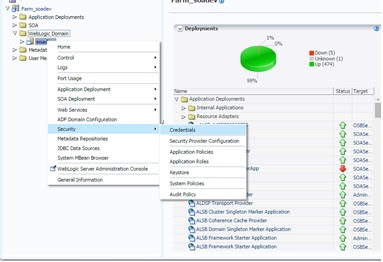
Open EM console. Navigate to Weblogic Domain -> Security -> Credentials


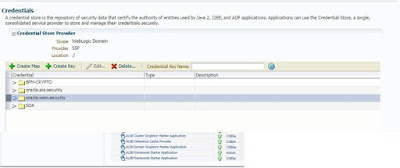
We have to create the new Key under "Oracle.wsm.security"
Enter the username password like below.
Name of the key can be anything.


2. Now we can use this Key in OSB inside the business service,

Login to sbConsole.

Create a business service. Enter the service Name and select the WSDL web service.


After creating business service you might get an error(if the wsdl have a security policy already).


In this case, just go to Policies under Businsess Service configuration, And click on Add Compatible or add this policy "oracle/wss_username_token_client_policy". 

If there are more policies, Please remove other policies which are not necessary (But first need to click 
on update button)


After adding the policy , you can see one more tab called "Security". Navigate to security tab and provide the key information over there.


After providing the key. Click on update and activate the session.

Wednesday, January 13, 2016

Run ant commands in Putty | weblogic server

To Run ant commands in weblogic server. First you need to set the environment variables, only then we can run the commands.
If you don't set the environment variables, you will get error as below,

...bin]$ ant -f build.xml

-bash: ant: command not found

To set, please go to the below path
Oracle/Middleware/wlserver_10.3/server/bin
and run the setWLSEnv.sh like below,

. ./setWLSEnv.sh


Monday, January 11, 2016

How to check the SOA Version Installed in your weblogic server

To check the SOA Suite Version installed in your server.

Please follow the below steps.
- Login to Putty.
- Run command ./soaversion.sh from location $SOA_ORACLE_HOME/bin 

Location will look something like below,


And the Result will display the complete SOA Suite version details.


Tuesday, August 18, 2015

Search a String inside BLOB column of Table in SQL

To search a particular sting in the BLOB contents, we can use the below SQL statement.

Syntax:
select * from Table_name
where  dbms_lob.instr(Column_name, utl_raw.CAST_TO_RAW('SearchString'), 1, 1) > 0 ;

Example
select * from mds_streamed_docs
where  dbms_lob.instr(sd_contents, utl_raw.CAST_TO_RAW('Siebel'), 1, 1) > 0 ;

Element declaration/definition of name are duplicated in schema - BPEL 11g

When we have the same element in two different schema with same targetnamespace, while compiling we will get the below error.

scac:
     [scac] Validating composite "C:\JDeveloper\mywork\POC\TestTOPXSD\composite.xml"
     [scac] /C:/JDeveloper/mywork/POC/TestTOPXSD/BPELProcess1.wsdl: error: Global element declaration/definition of name '{http://xmlns.oracle.com/POC/TestTOPXSD/BPELProcess1}process' are duplicated at the following locations:
     [scac] 
     [scac] file:/C:/JDeveloper/mywork/POC/TestTOPXSD/xsd/BPELProcess1.xsd [line#: 6]
     [scac] file:/C:/JDeveloper/mywork/POC/TestTOPXSD/xsd/sample1.xsd [line#: 6]
     [scac] There are at least two of them looking different:
     [scac] file:/C:/JDeveloper/mywork/POC/TestTOPXSD/xsd/BPELProcess1.xsd [difference starting at line#:9]
     [scac] file:/C:/JDeveloper/mywork/POC/TestTOPXSD/xsd/sample1.xsd [difference starting at line#:9]
     [scac] /C:/JDeveloper/mywork/POC/TestTOPXSD/BPELProcess1.wsdl: error: Message part "payload" is undefined [element = {http://xmlns.oracle.com/POC/TestTOPXSD/BPELProcess1}process
     [scac] /C:/JDeveloper/mywork/POC/TestTOPXSD/BPELProcess1.wsdl: error: Global element declaration/definition of name '{http://xmlns.oracle.com/POC/TestTOPXSD/BPELProcess1}process' are duplicated at the following locations:
     [scac] file:/C:/JDeveloper/mywork/POC/TestTOPXSD/xsd/BPELProcess1.xsd [line#: 6]
     [scac] file:/C:/JDeveloper/mywork/POC/TestTOPXSD/xsd/sample1.xsd [line#: 6]
     [scac] There are at least two of them looking different:
     [scac] file:/C:/JDeveloper/mywork/POC/TestTOPXSD/xsd/BPELProcess1.xsd [difference starting at line#:9]
     [scac] file:/C:/JDeveloper/mywork/POC/TestTOPXSD/xsd/sample1.xsd [difference starting at line#:9]
     [scac] /C:/JDeveloper/mywork/POC/TestTOPXSD/BPELProcess1.wsdl: error: Message part "payload" is undefined [element = {http://xmlns.oracle.com/POC/TestTOPXSD/BPELProcess1}processResponse
     [scac] Setting BPELC option 'classpath' to C:\Oracle\Middleware\jdeveloper\jdev\extensions\oracle.sca.modeler.jar;C:\Oracle\Middleware\jdeveloper\soa\modules\oracle.soa.fabric_11.1.1\fabric-runtime.jar;C:\Oracle\Middleware\jdeveloper\soa\modules\oracle.soa.mgmt_11.1.1\soa-infra-mgmt.jar;C:\Oracle\Middleware\oracle_common\modules\oracle.fabriccommon_11.1.1\fabric-common.jar;C:\Oracle\Middleware\jdeveloper\soa\modules\oracle.soa.bpel_11.1.1\orabpel.jar;C:\Oracle\Middleware\jdeveloper\soa\modules\oracle.soa.mediator_11.1.1\mediator_client.jar;C:\Oracle\Middleware\oracle_common\modules\oracle.mds_11.1.1\mdsrt.jar;C:\Oracle\Middleware\oracle_common\modules\oracle.adf.model_11.1.1\adfbcsvc.jar;C:\Oracle\Middleware\oracle_common\modules\oracle.adf.model_11.1.1\adfbcsvc-share.jar;C:\Oracle\Middleware\oracle_common\modules\commonj.sdo_2.1.0.jar;C:\Oracle\Middleware\modules\org.eclipse.persistence_1.1.0.0_2-1.jar;C:\Oracle\Middleware\oracle_common\modules\oracle.webservices_11.1.1\wsclient.jar;C:\Oracle\Middleware\oracle_common\modules\oracle.web-common_11.1.1.jar;;C:\JDeveloper\mywork\POC\TestTOPXSD\SCA-INF\classes
     [scac] BPELProcess1.bpel:47: error: XML element "{http://xmlns.oracle.com/POC/TestTOPXSD/BPELProcess1}process" of variable "Variable1" is not defined

BUILD FAILED
C:\Oracle\Middleware\jdeveloper\bin\ant-sca-compile.xml:279: Java returned: 1 Check log file : C:\JDeveloper\mywork\POC\TestTOPXSD\SCA-INF\classes\scac.log for errors


Possible Issues:
1. There might be reference from your bpel to same schema in two different places(may be one in local and another in MDS), where one of them is slightly different than other schema.

2. Both schemas shared by your target system may contains the same targetnamespace with changes in the elements.

Solution:
1. Point all the schema reference to one single place. if you still want to use both local and mds schemas, both the schemas should look be exactly similar.

2. Combine both the schemas into single one and use that in the code.


Junk Characters in SOAP UI Response

Sometimes while testing the Siebel web-services with SOAP UI, we use to get some junk characters as the response like below,


to avoid this issue, just goto File->Preferences-> Http Settings > Disable/uncheck "Accept compressed responses from hosts".


Thursday, July 23, 2015

Read One file at a time in SOA11g

To read one file at a time from server location, add below properties to the .jca file

property name="SingleThreadModel" value="true"
property name="MaxRaiseSize" value="1" --> It describes How many files at a time.
property name="ListSorter" value="oracle.tip.adapter.file.inbound.listing.TimestampSorterAscending" --> Files will be picked up based on timestamp(FIFO)